
Before I head off to Camp until next Sunday, I thought I should post that the nice man caring for Lil' Jim has just told me that the internal Wireless card is officially fried. The only way for Lil' Jim to communicate with the outside world is to strap him to life support... or wireless support, or something.
Well, like a good Mother (don't read into that), I shall still care for it no matter how many appendages are broken by it's own Mother (once again, don't read into that), serviced and declared dead.
I'll be grabbin' up a wireless card and continuing on like there's nothing wrong. Though, in the spirit of denial, I shall try one last thing to see if there's life in the card. I'm gonna try and stick in a Linux Live CD and see if it detects it. IT'LL WORK DON'T JUDGE ME AUUUUGH!!!
Wednesday, July 8, 2009


Tuesday, July 7, 2009
My Chromes. Let me show you them...
For the past few weeks, I've been using my Ubuntu PC as my predominant computer due to Lil' Jim still being in the shop (we miss you, man), so without the luxury of Windows Live Writer for writing my blog posts, I've been forced to use the in-house writer built into Blogger, but I digress.
The true nature of this post is to impart upon my fellow geeks and people who come here accidentally that Google Chrome is the bestest thing in the history of forever. Now, to some of you, you may think of this as some sort of metaphorical poke with a stick. Some of you may be thinking "But James! You cruel, un-moustachioed man! Chrome isn't available on Mac and Linux yet, stop torturing me!"
Well, you're right, Chrome is indeed not avai- Oh hey! Look at that!

That, dear reader, is Google Chrome running on Ubuntu 8.04.
Granted it's a dev build and not the final release, it's still Grease Lightning, no, it's Greased Grease Lightning. That's even faster.
I'm not kidding when I say that Chrome is fast on Linux, it's the fastest browser that I've ever used on any Operating System ever. However, it's not the final release for a reason, it's still not done. According to the splash page you see when you first open the brower, the following features have not been implemented yet:
- Plugins, including Flash (so no YouTube, Hulu, etc.)
- Printing
- Complex text
- Complex tab dragging
- Gears support
When I first downloaded Chrome, I spent the first few minutes attempting to make it crash. I only found one way to do it, and that was to exploit the lack of Complex tab dragging. This is where you drag a tab out of the browser window to form a new window out of the tab. It's not too bad until you try to drag the new window back into the old one again.
At least that was a problem until the alpha build was updated. With the release of the new Dev build a few days ago, the complex tab dragging seems to be working, soooo I don't really know why that's still on the splash page.
Now I'm stumped. This build is supposedly a minefield, yet I can't crash it, but maybe you can! Just visit the following link to download the dev build of Chrome for Mac and Linux (32-bit, 64-bit). Have fun.
![Reblog this post [with Zemanta]](https://lh3.googleusercontent.com/blogger_img_proxy/AEn0k_uP56JOiS035zH-hxIBhu2irbwp_YcynaNOT1JHI445rYMqLmg3JbnEcjQ1IEVpUE5TdH6T2AWtPoBJLnvukWzyR3xtvIwl3aBuqKHlLStXE376t7mNJCY0Z8_1qmEPTn6rEz0MXsuoc4ytnVoM-xr2=s0-d)
Monday, June 29, 2009
iPod Touch 3.0 Software Review...
I updated my iPod to version 3.0 around the day that the update came out, now it is time to share my experience with in the form of a software review.
Considering the fact that I have no form of screen capturing device with which to display screens from the iPod, I shall be conveying what I have seen with artistic depictions of each screen I deem necessary for you to see.


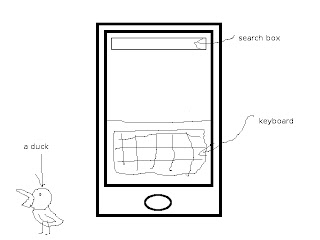 I tried it, it works. I don't really have anything to say about it, it just works.
Considering the fact that I have no form of screen capturing device with which to display screens from the iPod, I shall be conveying what I have seen with artistic depictions of each screen I deem necessary for you to see.

In this review, I shall be covering the new features mentioned here that I am able to with my available resources.
First on the chopping block is the newly introduced ability to download Movies, TV shows and Audiobooks right to your iPod via WiFi. The main screen for the new addition is pretty much the same as the music screen, the real difference is when you pick a film.

All in all, I think that this is a good addition, but I have to ask why? Is this so that I can buy whole Movies on the go? I see no real application for this other than to run your battery down. If I'm sitting in a McDonalds and I suddenly have the urge to watch Top Gun, I'll probably be done with my meal, be out of there and home before the movie's done downloading. If you're already at home, just use iTunes, there's no reason to use this feature unless you're in the same boat as I am and your computer's in the shop.
The next feature would have to be Spotlight Search, an addition to the Home screen. This feature will search your iPod's contact lists, emails, calendars, notes, music and videos for anything you type into the search box.
 I tried it, it works. I don't really have anything to say about it, it just works.
Finally ( also know as "I don't want to draw screens anymore"), we have copy and paste. With this feature, you are able to copy pieces of text and then proceed to paste them elsewhere. Looks like the jokes will have to stop here folks, the iPod and iPhone now have copy & paste. No, I'm not making a screen.
I also noticed after the update that the YouTube application had been updated with new features. You are now able to log into your YouTube account and merge your favorites and subscriptions with your device.
Something else I noticed is that when I turn on my iPod, after showing the Apple logo, there is a black screen for around five seconds. I was freaking out the first time this happened, but after those five seconds, the lock screen showed up instead of simply taking me to the home screen like it did previously. I've also noticed that it takes considerably longer to shut down that before, sometimes a good fifteen to twenty seconds.
All in all, I consider this update to be worth it, though I do think that ten dollars for a software update is a little steep.
Monday, June 22, 2009
Doom has come to Blurgh Nation...
What's this? Two posts in a day, surely I am going mad! Nay, if I am going mad, it is only with anticipation to announce the arrival of my new co-contributor: Doom.
Seriously, that's his last name. How can I not allow this man to blog along-side me?
Tony shall be covering anything and everything he chooses since I am heavily indimidated by him. However, like I do my Father, I both fear and respect him.
Tony Doom, everyone.

Seriously, that's his last name. How can I not allow this man to blog along-side me?
Tony shall be covering anything and everything he chooses since I am heavily indimidated by him. However, like I do my Father, I both fear and respect him.
Tony Doom, everyone.

Yep, I'm an idiot...
I accidentally deleted two of my blog posts last night; "The Speakers! They do Nothing!" and "To Go Where No Man Has Gone Before (Or Wants To Go)..."
Oh, my iPod and I are a crazy pair. If not for Google caching my site, I wouldn't have been able to salvage it.
Also, a minor update on the status of my Laptop, it is now in the hands of professionals. May their hands be guided with laser precision.
Oh, my iPod and I are a crazy pair. If not for Google caching my site, I wouldn't have been able to salvage it.
Also, a minor update on the status of my Laptop, it is now in the hands of professionals. May their hands be guided with laser precision.
UPDATE: The nice man taking care of my beloved Lil' Jim says that he'll have to back up my data and restore the OS, I should have my laptop back by Tuesday.
UPDATE 2: I got my Laptop back today! Now, since he reloaded the OS, I've lost all my programs, configuration settings aaaaand my Wireless still doesn't work. Makes me wonder what would happen if I installed Windows 7 RC1...
UPDATE 2: I got my Laptop back today! Now, since he reloaded the OS, I've lost all my programs, configuration settings aaaaand my Wireless still doesn't work. Makes me wonder what would happen if I installed Windows 7 RC1...
Sunday, June 21, 2009
My Uncle can beat up Your Uncle...
First off, Happy Father's Day to all who qualify. I know my father has had a nice father's day so far, and while I'd like to write a post about him, this piece seems to have come at an opportune time and I cannot ignore it.
Popular Internet TV Show CommandN has chosen my own Uncle, Philip Shaw as the recipient for their... wheelbarrow prize? Just watch the video and see for yourself, it's near the end:
Popular Internet TV Show CommandN has chosen my own Uncle, Philip Shaw as the recipient for their... wheelbarrow prize? Just watch the video and see for yourself, it's near the end:
You can't help but wonder what this wheelbarrow must be like for it to be a prize for anything. This thing must be so awesome that the manliest of men would shed a tear at the mere sight of it.

Saturday, June 20, 2009
A Shovel to the face would’ve been preferred…
Once again, I have been subjected to a rather violent bout of computer trouble, this time it was my WLAN driver.
I can almost guarantee that this will turn into some kind of rant about Windows Update, or HP being dumb and awesome at the same time considering that the source of my problem started with Windows update.
Last night around Eleven O’clock I had just updated my iPod touch to version 3.0, but that’s another post. After installing the update, I decided for the heck of it to check out my Windows Update to see if there was anything of interest, sure enough, there were two optional updates available.
One of the updates was for my Nvidia Chipset, I already knew that there was something wrong with this update considering I tried to install it before and it was corrupt, so I stayed away from that. The second one was for my internal Modem, I decided to install it, just on a whim. Why not, right? The shovel I mentioned above would've come in handy right about this point in the story.

Needless to say, no Rutila Ex Machina stopped me from having a terrible night and morning trying to get my WLAN to function again.
When I restarted my computer after installing the update, I realized that my HP Wireless Assistant only recognized my Bluetooth and my little network icon in the system tray had a friendly red X superimposed onto it. Dang it, you got me again Windows Update, you and your zany Devil updates.
I go into the device manager and I notice that not only is the WLAN driver not functioning, the hardware isn’t even listed, it’s gone.
So I used the trusty Eee pc sitting beside me to go to my computer’s software and drivers page on HP’s site and downloaded the previous version of the Modem driver that had been updated, installed it and it did nothing.
Ok, that’s cool, that’s fine, this ain’t my first time to the rodeo. I then decided to download the driver for my WLAN, I had all confidence that this would fix the problem considering that it’s for the component that was missing. Ok yeah, that didn’t do anything. This just got real.
I then decided to go for my old fallback, System Restore. You remember how I used that back in my previous post right? Yeah, man, that should do the trick. I do that, pick the date and start it up. My laptop boots back up aaand nothing, the problem still exists.
What? You’re kidding. I did it again, to a later date, nothing. I uninstalled the modem and refreshed the device manager, the modem reinstalled itself but the WLAN was as elusive as it ever was.

I’m not entirely sure what went on last night after that considering that I was blind with rage, all I know is that I woke up today in my bed and I smelled like something I shouldn’t smell like (I’ll let your minds do the walking).
When I went to work today I took a different approach. Just kidding, I did another system restore, it did nothing. I then tried something different, I used my HP Recovery Manager to restore the original driver for my WLAN. I was fairly confident that that would work. Once again I was met with nothing in the form of Wi-Fi. Needless to say, I was very frustrated and defeated, there was never a computer problem I couldn’t fix.
I decided to take another approach, I uninstalled the Modem and installed the WLAN driver, something interesting then happened. The modem was all of a sudden recognized and installed. What? Why is the Modem installing when I’m installing the WLAN driver? That’s when I had an idea.
I uninstalled the Modem again, as well as the Broadcom WLAN driver and then I installed the WLAN driver through the Recovery Manager, once again, while the Recovery Manager installed the driver, the Modem was recognized and installed, I couldn’t do anything about it since it was automatically going to restart a few seconds afterwards.
Ugh, I was pretty defeated, the Modem was installed again, and the WLAN was still not recognized. I was even considering sending it to a “Professional,” but then I saw the device manager in my system tray, it was installing the Wireless network!
So needless to say, I am relieved and happy to have my laptop working again at full throttle. One good thing did come out of all of this though, I had enough material to write a new blog post.
UPDATE: Just turned it on after shutting it down last night before going to sleep, I guess that wasn't a permanent fix. So, in short: brb depression.
Subscribe to:
Posts (Atom)